Help Center›FreeBASIC
Transkeyword
Parameter to the Put graphics statement which selects transparent background as the blitting method
Syntax
Put [ target, ] [ STEP ] ( x,y ), source [ ,( x1,y1 )-( x2,y2 ) ], TransDescription
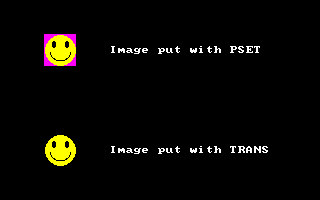
Trans selects transparent background as the method for blitting an image buffer. This is similar to the PSET method, but pixels containing the mask color are skipped.For 8-bit color images, the mask color is palette index 0. For 16/32-bit color images, the mask color is Magenta, which is
RGB(255, 0, 255). The alpha value is ignored when checking for the mask color in 32-bit images.Note: for 32-bit images, the alpha value of pixels may be changed to 0. This is for efficiency reasons. To preserve the alpha values, a custom blender may be used, as in the second example below.
Remarks
Differences from QB
- New to FreeBASIC
See also
Example
'' set up a screen: 320 * 200, 16 bits per pixel

ScreenRes 320, 200, 16


'' set up an image with the mask color as the background.

Dim img As Any Ptr = ImageCreate( 32, 32, RGB(255, 0, 255) )

Circle img, (16, 16), 15, RGB(255, 255, 0),     ,     , 1, f

Circle img, (10, 10), 3,  RGB(  0,   0, 0),     ,     , 2, f

Circle img, (23, 10), 3,  RGB(  0,   0, 0),     ,     , 2, f

Circle img, (16, 18), 10, RGB(  0,   0, 0), 3.14, 6.28


'' Put the image with PSET (gives the exact contents of the image buffer)

Draw String (110, 50 - 4), "Image put with PSET"

Put (60 - 16, 50 - 16), img, PSet


'' Put the image with TRANS

Draw String (110, 150 - 4), "Image put with TRANS"

Put (60 - 16, 150 - 16), img, Trans


'' free the image memory

ImageDestroy img


'' wait for a keypress

Sleep
Function trans32 ( ByVal source_pixel As ULong, ByVal destination_pixel As ULong, ByVal parameter As Any Ptr ) As ULong

    '' returns the source pixel

    '' unless it is &hff00ff (magenta), then return the destination pixel

    If (source_pixel And &hffffff) <> &hff00ff Then

        Return source_pixel

    Else

        Return destination_pixel

    End If

End Function


'' set up a screen: 320 * 200, 16 bits per pixel

ScreenRes 320, 200, 32


'' set up an image with the mask color as the background.

Dim img As Any Ptr = ImageCreate( 32, 32, RGB(255, 0, 255) )

Circle img, (16, 16), 15, RGB(255, 255, 0),     ,     , 1, f

Circle img, (10, 10), 3,  RGB(  0,   0, 0),     ,     , 2, f

Circle img, (23, 10), 3,  RGB(  0,   0, 0),     ,     , 2, f

Circle img, (16, 18), 10, RGB(  0,   0, 0), 3.14, 6.28


'' Put the image with PSET (gives the exact contents of the image buffer)

Draw String (110, 50 - 4), "Image put with PSET"

Put (60 - 16, 50 - 16), img, PSet


'' Put the image with TRANS

Draw String (110, 100 - 4), "Image put with TRANS"

Put (60 - 16, 100 - 16), img, Trans


'' Put the image with TRANS

Draw String (110, 150 - 4), "Image put with trans32"

Put (60 - 16, 150 - 16), img, Custom, @trans32


'' free the image memory

ImageDestroy img


'' wait for a keypress

Sleep
Reference
- Documented in KeyPgTransGfx.html